


Since 2005—the year Black Friday first allegedly eclipsed the Saturday before Christmas as the biggest shopping day of the holiday season—the shopping event has only grown in size and popularity. First, there was the addition of Cyber Monday. Then, it became full-on Black November.
Now, owing in part to the growth of ecommerce since the start of the pandemic, this Black Friday Cyber Monday (BFCM) is predicted to be unlike any that we’ve seen before.
We packaged our holiday selling season data during Black Friday Cyber Monday
Download your copyRecent research by Google indicates that more people than ever before are open to online shopping, with nearly 75% of shoppers planning on doing their holiday shopping online this year. Plus, there are 2.6 billion customers willing to try new brands. And even before the pandemic, BFCM 2020 was gearing up to be massive based on last year’s numbers; according to Adobe, in 2019, BFCM sales topped $28 billion, with most sales happening within a four-hour window on Cyber Monday.
It’s not just shoppers’ behavior that’s changing: Ecommerce retailers are preparing to meet the increase in demand. This year, two-thirds of Shopify merchants plan on hosting pre-Black Friday events, over a third plan to host post-sales, and 38% also plan on introducing new products for BFCM.
All of these forces are colliding to create an unprecedented online sales opportunity. But new shoppers and events also present challenges for brands during an already-busy period. When inventory changes rapidly, communications between your team, suppliers, and with customers need to be seamless. But with so many moving pieces, how do you ensure everything runs smoothly?
Enter Shopify Flow—a built-in automation program built by Shopify—that lets you get more done and scale your business. With Flow, you can build unique workflows that automate tasks and processes in your store. The fastest way to do this is to use a pre-built Flow template, which can be customized to meet your needs, takes minimal time to install, and requires almost no tech know-how to set up.
Not only will Flow help you eliminate manual tasks and potential human errors, but it also will help save you time over the BFCM sales period.
Here are four Shopify Flow templates that you can try with a click of a button.
Problem #1: Coordinating your sales launch with marketing emails in separate places
When it comes to BFCM, customers know the drill. They log-on at the chime of 12:01 a.m. on Friday, November 27 or Monday, November 30, no prompting necessary.
Unfortunately, the same isn’t true for pre- or post-Black Friday events—or even for other events, such as product drops or collection mark-downs. Sure, you could notify them hours before with an email, but then you run the risk of your message being opened only to be forgotten. Timing your communications to go out at the same time as your event starts builds a sense of urgency and FOMO, which is critical in making your flash sale a success.
So how do you ensure that an email campaign reaches shoppers the exact moment your sale kicks off?
The solution: Create an automated email campaign that’s timed to coincide with the launch of your sales event
The latest Shopify Flow template available to merchants connects Launchpad sales events to Klaviyo email campaigns. (As with all of Shopify Flows, this template can be edited to work with other notification platforms like PushOwl.)
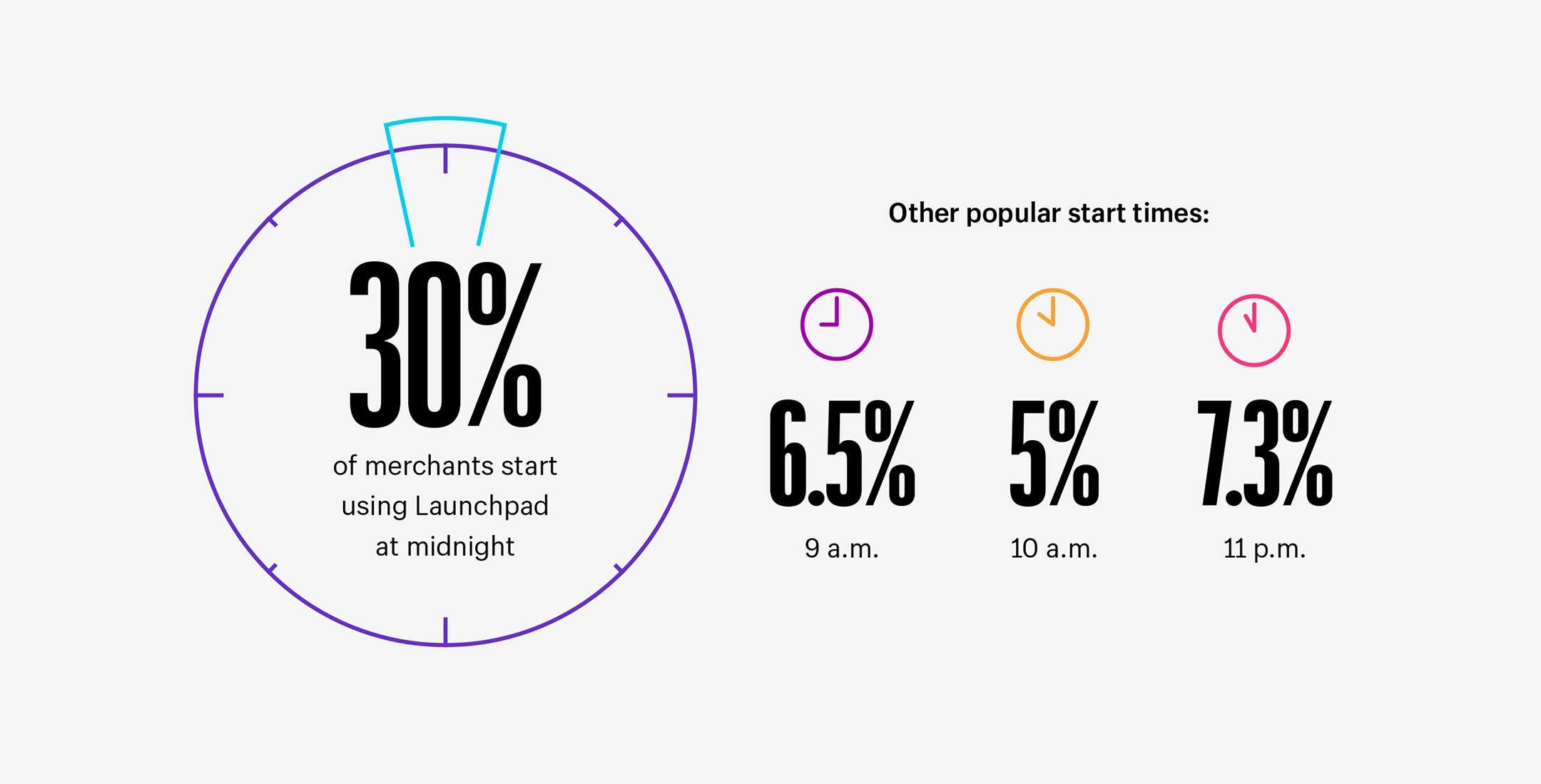
Say your sale starts at midnight. After setting up your Launchpad event, open this Flow Template and adjust the Klaviyo settings to connect the Flow to the correct email campaign. Then, the moment your Launchpad event goes live at 12 a.m., Flow will automatically trigger Klaviyo to send emails to your subscribers, letting them know that your sale has started.
Time your email with the launch of your sales event
Use Shopify Flow templateProblem #2: Manually managing inventory during sales, with mistakes costing valuable marketing dollars
For ecommerce retailers with hundreds or thousands of products in stock, managing inventory can be a painstaking process that’s prone to human error. During BFCM, products sell at such a rapid pace that you run the risk of selling a product that’s already sold out; a move that can alienate customers (especially if they’re first-time buyers) and potentially lead to negative online reviews.
That’s not the only way it can cost your business money. Suppose, for example, you’re running a targeted marketing campaign for a particular product. If it sells out without your knowledge but ads continue to run, that’s marketing money that’s gone to waste.
The solution: Set up a Shopify Flow that automatically alerts you when a product is low or out-of-stock
In Shopify Flow, you can set up an automation that notifies your marketing or fulfilment teams when a product is nearly out of stock or when it’s completely sold out. Doing so eliminates human error from the process, and prevents dealing with refunds or cancellations on limited-run products.
That’s exactly what Cozykids has done. The Greece-based retailer specializes in kids’ home furnishings and toys and has some 7,000 products in stock. So instead of relying on staff to manage inventory, they fully automated the process with a multi-tiered inventory warning system in Shopify Flow.
First, when an item reaches a specific inventory level, an initial alert is sent to a Slack channel shared by marketing and fulfillment. It’s a cursory nudge that it may be time to reorder from suppliers. It’s also a cue for marketing to adjust online ad campaigns, so they can focus on alternate products with higher inventory. Finally, when a product sells out, it’s automatically hidden so that buyers can no longer click “Add to cart.”
This Shopify Flow has also become part of Cozykids’ omnichannel experience, helping staff at its brick-and-mortar locations to make sales and provide better customer service. Sales associates are able to check the Slack channel, which they can use to promote items that are moving fast.
It might sound complex, but setting up a similar workflow like this only takes minutes using one of our inventory management templates. As with all Shopify Flow templates, the process can be tweaked to fit your needs.
Get alerts when a product is low or out-of-stock
Use Shopify Flow templateProblem #3: Flash sales events attract resellers who are attempting to buy as much product at the lowest price point possible
Shoppers aren’t the only ones driven by a deal on BFCM—flash sales events also attract bad bots and fraudsters. According to research conducted by bot mitigation company Distil, ecommerce retailers experienced a 20% increase in bot traffic during BFCM week in 2017, including attacks that could be easily detected. That’s the problem: Resellers know they have a better chance of flying under the radar during BFCM. The result is that already-limited inventory can be depleted in a matter of minutes.
The solution: Set up an automation that prevents known fraudsters from purchasing products
The good news is that bot protection is already built into Shopify. But blocking known fraudulent customers can add another layer of protection during busy sales periods when you’re less likely to pick-up on sketchy behavior. (As reported by Complex, this type of multi-layered security approach is exactly what Union Los Angeles has used to stop bots from snatching up its highly coveted sneaker collabs.)
Arguably the easiest-to-set-up Flow that we’ve included here, all you need is the email or IP addresses of known resellers. Then, edit the “cancel, refund, and restock high-risk orders ” template and it will do just that. If an order is placed by a shopper on your blacklist, it will automatically be cancelled and restocked, so that legitimate shoppers get through first.
Cancel, refund, and restock high-risk orders
Use Shopify Flow templateProblem #4: Your product reaches shoppers on day five, but they don’t receive their welcome email until day seven
From where to sign up for a warranty, to how to use or care for a product, welcome campaign emails contain information that customers value and need. Maybe that’s why they have such a high clickthrough rate:
Compared to regular email campaigns, welcome emails have an unusually high open rate of around 50%, with some retailers reporting higher revenue as a result.
Unfortunately, determining when to send these welcome campaigns is largely based on guesswork. Suppose you know that your product is delivered within five to seven days on average, so you time a welcome email to arrive on day six. It’s an educated guess, but what happens when the customer receives the product on day one or day 10?
A long lag between the arrival of a product and receiving a welcome email doesn’t just leave a less-than-stellar impression of your store—it can also increase your workload during sales periods if the customer has any questions that remain unanswered.
The solution: Set up your welcome campaign to arrive on the exact same day a customer receives their package
The “Kick off a welcome campaign when the package is delivered" template is a Shopify Flow that guarantees a post-product experience happens the same day your product arrives into your customer’s hands. It eliminates artificial wait times by using a fulfillment event status trigger. The moment your fulfillment partner alerts you of delivery, your onboarding campaign is delivered to the customer.
Again, as with many Shopify Flows, this template can be modified according to the email app of your choice: The template is set up to connect with Klaviyo, but can be modified to work just as easily with other messaging platforms that have built Shopify Flow Connectors, including Klaviyo, Omnisend, Bronto, PushOwl, SMS Bump, and dotdigital.
Kick off a welcome campaign when the package is delivered
Use Shopify Flow templateAutomate your Black Friday Cyber Monday
This year’s BFCM will see more people shopping online than ever before—including online shopping newbies and those customers searching for new brands to buy. It’s an opportunity unlike ever before.
These four workflows are just a few of the dozens of fully customizable templates in Shopify Flow that can help you with this BFCM. By taking advantage of our built-in automated processes, you’ll have more time to focus on urgent matters and what matters most—ensuring your customers receive the best online shopping experience possible.
Shopify Flow FAQ
What is Shopify Flow?
Shopify Flow is a built-in automation app that lets merchants build custom workflows to handle repetitive store tasks without writing code. Workflows run on a trigger, condition, and action structure: an event sets the workflow in motion, a condition checks whether specific criteria are met, and an action carries out the task, such as sending an alert or hiding a sold-out product.
Is Shopify Flow free, and which plans include it?
Shopify Flow is a free app available on the Basic, Grow (Shopify), Advanced, and Plus plans, with no extra subscription cost. Some features, such as the Send HTTP Request action, are limited to Grow, Advanced, and Plus stores, and usage limits vary based on the API limits tied to each plan.
Do I need coding skills to build a Shopify Flow workflow?
No coding or development experience is required to build a workflow in Shopify Flow. Merchants define a trigger, set conditions using an if-then structure, and choose an action, all through a visual builder in the Shopify admin, making the tool accessible even for stores without a technical team.
How do I create a new workflow in Shopify Flow?
Install the Shopify Flow app from the Shopify admin, then select a trigger, add any conditions, and define the resulting action to build a workflow from scratch. Merchants can also skip manual setup entirely by choosing a pre-built template and adjusting the settings, such as connecting an email platform, before turning the workflow on.
Can Shopify Flow connect with third-party apps like Klaviyo or Slack?
Yes, Shopify Flow can trigger actions in connected third-party apps, letting a single workflow span messaging platforms, inventory tools, and internal team channels. Common connectors include email and SMS platforms as well as notification tools like Slack, which merchants use to alert marketing or fulfillment teams the moment a condition is met.
What are some limitations of Shopify Flow?
Shopify Flow does not support every Shopify event as a trigger, and processing large batches of items in a loop can slow a workflow down. Merchants should test new workflows with sample orders before activating them, check the available trigger list ahead of planning complex automations, and monitor workflow logs since failures can happen silently.

